Accounting
General ledger, receipts and payments, cheques, VAT and financial statements connected to every transaction.
What is Accounting in Platinum ERP?
Platinum ERP Accounting is the general ledger of the system: every sales invoice, purchase invoice, point of sale sale, payroll and payment posts its journal entry automatically, through accounts the company links once. Accountants record journals, receipts, payments and cheques, close periods and read the trial balance, income statement and balance sheet without exporting data to spreadsheets.
How the ledger stays correct
The rules that protect the figures are applied on the server and in the database, not only on the screen. A posted voucher must be unposted before it can be changed, a draft never posts by itself, the company currency is always the ledger currency, and a voucher dated inside a closed period is refused whatever screen, phone or device sends it.
Who needs it
Common problems and how Platinum ERP solves them
Sales, purchases and payments are entered twice: once in the operational system and again in the accounts.
Invoices, point of sale sales, returns and payroll post their own journal entries through the company's linked accounts, so the ledger is filled by the operations themselves.
Entries posted to summary accounts make the reports impossible to read.
Transactions are accepted only on last level accounts, and the account tree is limited to four levels, so every balance rolls up cleanly from the detail.
Old months are changed after the figures were reported.
Period closing locks every voucher dated on or before the closing date, and no voucher can be dated in the future. The check is enforced by the database itself, for every screen and every channel.
Post-dated cheques are followed on paper and their status is never clear.
Every received or issued cheque has a status (under collection, collected, returned, issued, cleared, cancelled). Each move posts its own entry and keeps a history that can be undone step by step.
Foreign currency invoices change value every time they are opened.
A voucher keeps the exchange rate it was saved with. The ledger stays in the company currency while the screens show the amount as it was entered.
How the daily work looks
- 1
Set up once
Review the default chart of accounts created with the company, add your banks and cost centers, and link the accounts the system posts to: cash, sales, purchases, VAT, cheques and the parents of new clients and suppliers.
- 2
Record the day
Enter journal vouchers line by line with the next line pre-filled with the balancing amount, record receipts and payments by cash, bank transfer or cheques, and import long journals from Excel.
- 3
Follow cheques
Move received cheques to collected or returned and issued cheques to cleared or cancelled from one screen; each move creates its own accounting entry.
- 4
Review and post
Drafts are reviewed before posting. Posting creates the journal lines; a posted voucher can't be changed until it is unposted by a user who holds that permission.
- 5
Close and report
Close the period, then read the trial balance, the income statement with month, branch or cost center comparison, the balance sheet and the account statements.
Available features
Chart of accounts
A default account tree for every new company, up to four levels, transactions on last level accounts only, inactive accounts refused on manual journals.
Linked accounts
Cash, sales, returns, purchases, input and output VAT, cheques and party parents are fixed once per company; invoices never pick accounts by name.
Journal, receipt and payment vouchers
Daily journals, receivable and payable vouchers with cash, bank and multiple cheques, a required cost center and an accounting entry viewer on every voucher.
Cheque management
Received and issued cheques with due dates, unique issued numbers per bank, status moves that post their entries and a full movement history.
Multi-currency
Vouchers in any currency at a rate that never drifts after saving, with the ledger always in the company currency.
Opening balances
One opening balance voucher per branch and year, saved account by account with a change history.
Debit and credit notes
Adjustment notes for clients, suppliers and ledger accounts with VAT treatment per line, included in the VAT report.
Account balance limits
Maximum and minimum debit or credit balances per account, checked at posting time.
Period closing
A closing date per company and a rule against future dates, enforced by the database for every document type that affects the ledger.
Audit trail
Who created, changed, posted and unposted each voucher, with the voucher audit screens and the change history.
Works with the other modules
Posting a sales invoice debits the client, credits sales and output VAT; a cash invoice also records the payment in the same voucher.
Posting a purchase invoice debits purchases and input VAT and credits the supplier.
Each point of sale sale debits the account of every payment method used and notes the terminal on every journal line.
A posted payroll creates one journal split by each division's cost center: salaries, social security, income tax and employee accounts.
An expense voucher is a journal built by the server from expense lines, VAT and the payment account.
Reports
- Account statement with opening and running balance, transaction type filter and printable layout
- Trial balance with last level and hide zero balance options
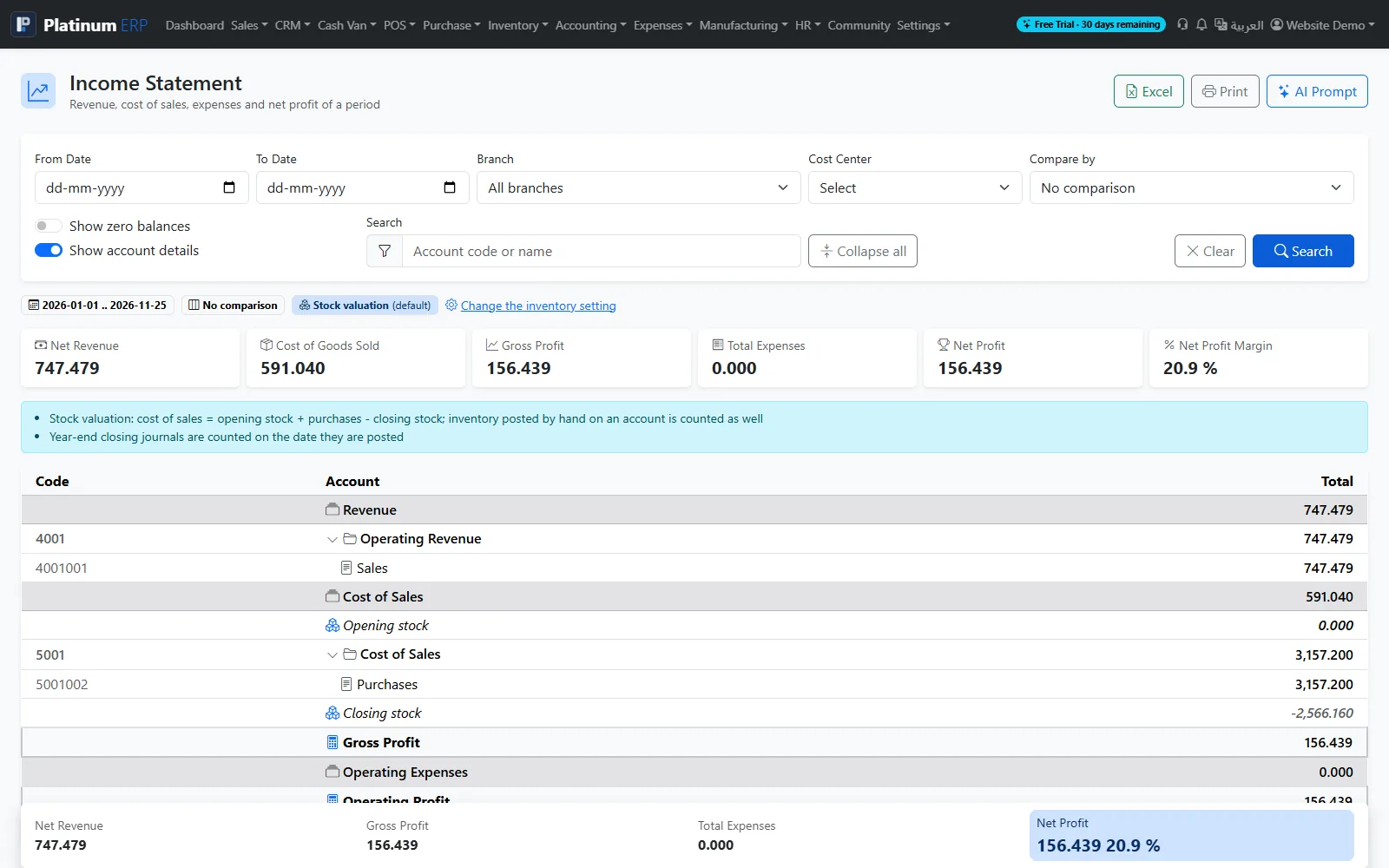
- Income statement with comparison by months, branches or cost centers
- Balance sheet with the current year profit calculated, never a balancing figure
- Account aging by month-end balances
- VAT report by rate, including debit and credit notes
- Cash flow, cheque forecast and cash flow forecast
- Voucher audit lists for accounting, sales, purchases and stock
Benefits for employees
- No double entry: operations create their own journal entries
- Fast journal entry with keyboard flow, balancing amounts and Excel import
- Clear messages when a voucher breaks a rule, before anything is saved
Benefits for management
- Financial statements available at any moment without waiting for month end
- Closed periods that stay closed, and a full audit trail of every change
- Profit compared by month, branch and cost center in one report
Related modules
Cash Flow
See where the cash went, which cheques fall due, and how the balance is expected to move over the coming months.
Learn moreExpenses
Record every expense in a few fields, schedule the recurring ones, and let the system build the accounting entry.
Learn moreSales
Sales orders, invoices and returns connected to stock, the client's account and detailed sales and profit reports.
Learn morePurchasing
From the reorder suggestion to the posted purchase invoice: orders, receiving, invoices, returns and landed cost in one flow.
Learn moreReports and Dashboards
One dashboard for the whole business and a reports center that covers every department, all from the same live data.
Learn moreFrequently asked questions
Does Platinum ERP create the journal entries of invoices automatically?
Yes. Posting a sales or purchase invoice, a return, a point of sale sale, a payroll or an expense creates its journal lines through the accounts the company linked once. Accountants don't re-enter them.
Can I work in more than one currency?
Yes. Invoices, returns, receipts, payments and journals can be in another currency. The rate is taken from the currency card when the voucher is created and stays fixed afterwards, and the ledger is kept in the company currency.
How does period closing work?
You set a closing date per company. From then on no voucher dated on or before that date can be added, changed, posted, unposted or deleted, and no voucher can be dated after today.
Can I see the financial statements per branch?
Yes. The trial balance, account statement and balance sheet take a branch filter, and the income statement can compare branches or cost centers side by side.
Keep reading
Cheque Management
Know where every received and issued cheque is, and let each status change post its own entry.
Learn moreAccounts Receivable
Following what clients owe, recording what they pay and turning received cheques into money in the bank.
Learn morePeriod Closing and Financial Reporting
Review the month, close it so nobody can change it, and read financial statements that agree with every document.
Learn moreStart your free one-month trial
Discover how Platinum ERP can help you manage your business with confidence. Every module, your own company data, no payment details.