Inventory
Items, barcodes, stores, stock movements and stock taking, with one stock rule shared by every screen and report.
What is Inventory in Platinum ERP?
Inventory in Platinum ERP is the item and stock module of the system: it keeps the item cards with their barcodes, units and packs, and counts the stock of every store from the posted purchases, sales, returns, adjustments, transfers and internal use. Storekeepers adjust, count and transfer stock, and managers read stock balances, item movements and expiry reports from the same figures.
How the stock is worked out
Platinum ERP does not store a stock quantity that people can overwrite. The stock of a store at a date is the sum of its posted documents: purchases and sales returns add, sales and purchase returns remove, adjustments, transfers and internal use move it in their own direction. Physical quantity includes free units, and every quantity is converted to the item's base unit through its barcode's pack quantity.
Who needs it
Common problems and how Platinum ERP solves them
The stock on the screen never matches the shelf, and nobody knows which document caused the difference.
Stock is never typed: it is worked out from the posted documents of each store, and the item movements report lists every posted line with its document, party and running balance.
Items are sold by the piece and bought by the carton, so quantities get mixed up.
Each barcode has its own unit and pack quantity (for example Carton = 24), and every quantity is converted to the item's base unit by one rule used everywhere.
Stock taking takes days and its differences are corrected by hand.
Scan each item's main barcode and type the counted quantity; applying the count recalculates the stock on the server and posts one stock in and one stock out adjustment for the differences.
Goods move between branches on paper and disappear on the way.
A stock transfer is sent, stays in transit without moving stock, and is received or rejected by the destination branch. Stock moves only when it is received.
Expired goods are found on the shelf instead of being planned for.
Purchases and stock in adjustments can carry an expiry date, an item can require one, and the item expiry report and the dashboard show what has expired or is about to.
How the daily work looks
- 1
Build the item list
Create item cards with a category, base unit, VAT, supplier and barcodes with their own unit, pack quantity, price and cost, or import many items at once from Excel with a server-checked preview.
- 2
Receive and sell
Purchase invoices and sales returns add stock, sales and purchase returns remove it, each in the store of the document, as soon as the document is posted.
- 3
Adjust and use internally
Record damage, samples or found stock with stock adjustments of your own types, and goods taken for the company's own use with the internal use voucher.
- 4
Move between stores
Send stock transfers between stores and branches; the destination receives or rejects them, and the stock check runs again at receipt.
- 5
Count and review
Run stock taking by scanning, apply the differences, then review the stock balance, stock taking differences and item movement reports.
Available features
Item cards
Category, base unit, VAT or exemption, supplier, brand, picture, minimum and maximum order levels, and switches to stop new sales or purchases of an item.
Barcodes, units and packs
Several barcodes per item, each with its own unit, pack quantity, price and cost; one main barcode, and saved barcodes that can't be deleted or renamed.
Category tree
Categories up to three levels with items on the last level only; each category posts to its own cost center.
Stock adjustments
Stock in, stock out and record-only adjustment types, with the users allowed on each type; posting moves stock without a journal entry.
Stock taking
Count by scanning the main barcode, then apply the differences as one stock in and one stock out adjustment in one transaction; a repeated apply never posts twice.
Stock transfers
Draft, sent (in transit) and received stages between stores or branches, with a stock check at receipt and a receive count in the menu.
Internal use
Stock taken for the company's own use, valued at the item cost and posted to an expense account and cost center.
Expiry dates
Optional expiry dates on purchases, receipts and stock in adjustments, required per item when needed, with an estimated remaining quantity per expiry date.
Costing engine
Five costing methods kept per branch and item (card cost, last cost, moving average, FIFO next layer, FIFO weighted), one for everything or separate for valuation, outgoing documents and the cost of sales, with periodic or perpetual inventory.
Excel import and export
Import items, adjustment lines and stock taking from Excel and export every list and report to a formatted workbook.
Works with the other modules
Posted purchase invoices add stock at their cost and update the item cost; received purchase orders become purchase invoice drafts.
Posted sales invoices remove stock and sales returns bring it back, in the store of each document.
Every point of sale sale and return moves the stock of the terminal's store.
Internal use posts its own journal entry, and the balance sheet can value the stock at the reporting date.
Posting a production order takes the raw materials out and puts the produced item in at its production cost.
Reports
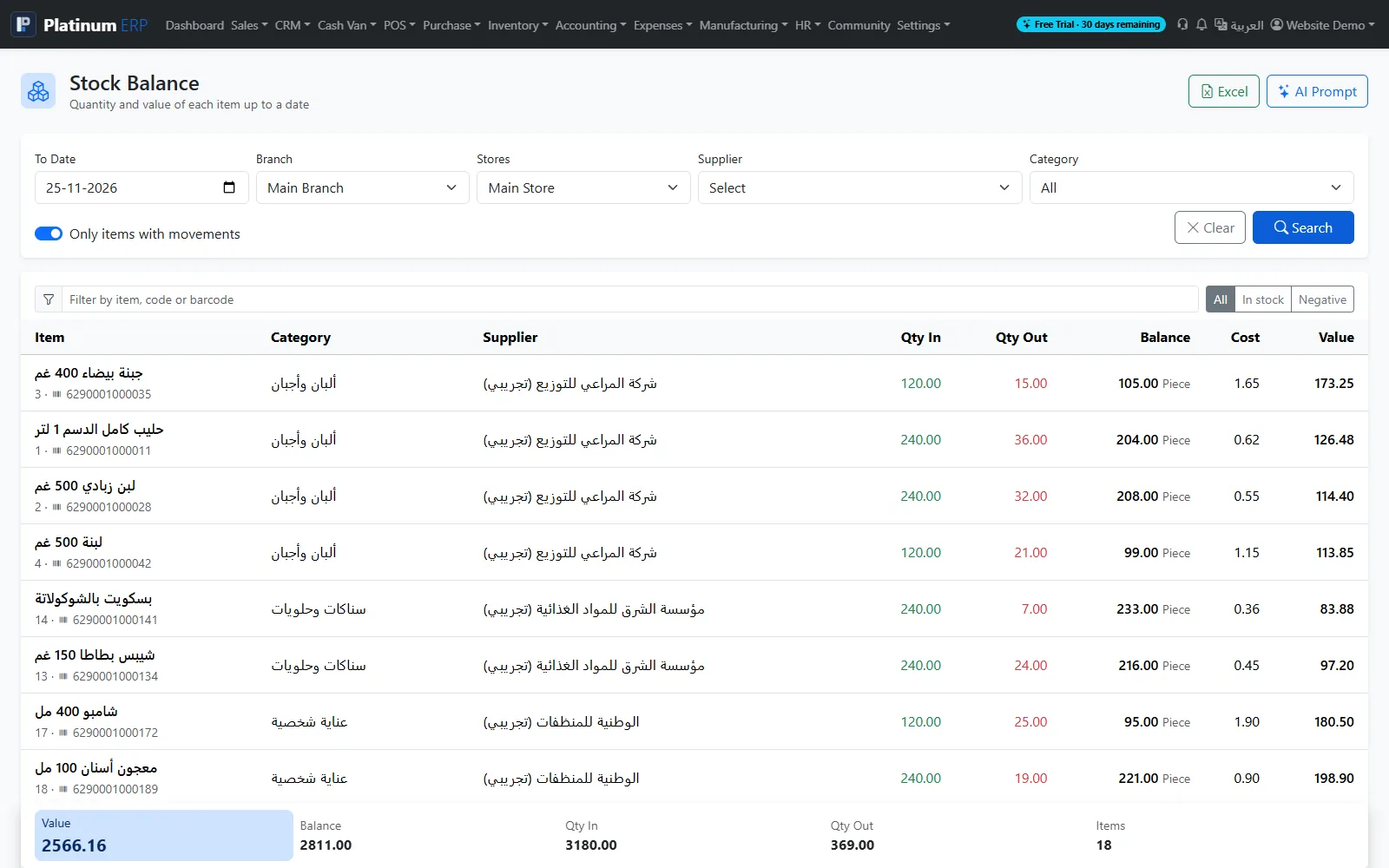
- Stock balance per item and store at any date, with value and negative stock filter
- Item movements with opening and running balance in the main barcode unit
- Stock taking differences with increases, decreases and net value
- Item expiry report: expired, expiring soon or all dated stock
- Item report by category, brand, supplier, VAT and unit
- Top categories and items by stock value or quantity
- Stock audit list of adjustments, transfers and internal use
Benefits for employees
- Scan-based counting and entry: Enter adds, 3*barcode adds three
- One screen per task with clear refusals before anything is saved
- Excel import for long item and line lists
Benefits for management
- One stock figure shared by every screen, report and branch
- Transfers that can be followed from sending to receipt
- Early warning of expired and expiring stock on the dashboard
Related modules
Purchasing
From the reorder suggestion to the posted purchase invoice: orders, receiving, invoices, returns and landed cost in one flow.
Learn moreSales
Sales orders, invoices and returns connected to stock, the client's account and detailed sales and profit reports.
Learn morePoint of Sale
A full screen sale screen in the browser that keeps selling without a connection and posts every sale to stock and the accounts.
Learn moreAccounting
General ledger, receipts and payments, cheques, VAT and financial statements connected to every transaction.
Learn moreMulti-Branch Management
Every branch and store in one company, with access, stock movements, prices and results kept per branch.
Learn moreManufacturing and Quality Control
Recipes, production orders and quality checks that move raw materials and finished goods through the same stock as the rest of the business.
Learn moreFrequently asked questions
Which costing method does Platinum ERP use for items?
The company chooses: card cost, last cost by branch, moving average by branch, FIFO next layer or FIFO weighted. New companies start on moving average; existing companies keep the last purchase cost including landed cost until they start the engine from Inventory > Costing Settings. Every posted stock line keeps the cost it was recorded at.
Can one item be sold by the piece and by the carton?
Yes. Give the item a barcode per unit, each with its own pack quantity and price. Stock is always counted in the item's base unit.
Does a stock transfer move stock as soon as it is sent?
No. A sent transfer is in transit and moves nothing. Stock leaves the source store and enters the destination store only when the destination branch receives it.
Can I import my items from Excel?
Yes. Each row is an item with its main barcode, name, price including VAT, cost and an existing supplier. The server checks every row in a preview first and saves only the rows that are ready.
Keep reading
Inventory Stock Taking
Count what is on the shelf, keep the count as its own document, and let posting compare it with the system quantity and correct the difference.
Learn moreBranch Stock Transfer
Moving goods between stores and branches with a sender, a receiver and a clear in-transit stage in between.
Learn moreInventory Costing
Choose how your company costs its stock, and see how every recorded cost reaches the stock value, the cost of sales and the ledger.
Learn moreHow to control inventory
Inventory is controlled by clear procedures that people follow every day. Software records every movement and shows where the procedure was not followed.
Learn moreReduce inventory loss and shrinkage
Inventory loss comes from damage, expiry, receiving errors, unrecorded use, mistakes at the till and theft. Each source has its own control.
Learn moreSupermarkets
Fast checkout at the till, fresh items sold by weight, shelves refilled on time and a stock count you can trust.
Learn moreUnderstanding FIFO, Moving Average and Last Cost
The same goods, bought at different prices, can be valued in different ways. The method you use changes both your stock value and your profit.
Learn moreStart your free one-month trial
Discover how Platinum ERP can help you manage your business with confidence. Every module, your own company data, no payment details.