Sales
Sales orders, invoices and returns connected to stock, the client's account and detailed sales and profit reports.
What is Sales in Platinum ERP?
Sales in Platinum ERP manages what the company sells to its clients: sales orders that commit prices without moving stock, sales invoices made from those orders or entered directly, cash invoices, and sales returns against the original invoice. Posting an invoice removes the stock, debits the client's own account, credits sales and VAT, and feeds the sales analysis reports by category, client, branch, day and hour.
Who needs it
Common problems and how Platinum ERP solves them
Agreed prices are lost between the order and the invoice, and orders get invoiced twice.
A sales invoice made from a sales order takes the agreed price and discount of each line, and the quantity left on the order is re-checked under a lock, so an order can never be invoiced beyond what was ordered.
Returns are refunded at the wrong price or for more than was sold.
A return against an invoice takes the client, store and prices of that invoice, and each barcode can't exceed the quantity sold minus earlier returns.
Discounted lines overstate the VAT.
VAT is always worked out on the amount after the line discount, on the server, whatever the browser sends.
Sales reports are built by hand in spreadsheets from exported invoices.
Sales by category, client, branch, supplier, VAT rate, day, hour and cost center, with cost and margin, are ready reports with filters and Excel export.
How the daily work looks
- 1
Set up clients
Create clients with their own account, client type, contact details, salesman and delivery locations.
- 2
Take the order
Enter a sales order with agreed prices, discounts, line notes and a validity date, confirm it, print it or send it to the client by e-mail from your own mail program.
- 3
Invoice
Convert the confirmed order into one or several invoices as goods are delivered, or enter an invoice directly by scanning; mark it as a cash invoice when it is paid at once.
- 4
Post
Posting the invoice removes the stock, debits the client, credits sales and VAT and, for a cash invoice, records the payment through the cash account.
- 5
Return and analyse
Return goods against the original invoice, then follow open orders, client balances and the sales and profit reports.
Available features
Sales orders
Draft, confirmed and cancelled stages; partly invoiced, completed and expired worked out from the invoices; validity extension, print and e-mail to the client.
Sales invoices
Scan-based lines with qty, free goods and discounts, the item's VAT and price, inline editing, phone-friendly cards and a sticky totals bar.
Cash invoices
One switch records the sale and its payment in the same voucher, so the client's balance nets to zero.
Sales returns
Returns against the posted invoice at its own amounts, free units returned at zero value, or returns without an origin.
Price control
Selling below the card price on a sales order needs a dedicated permission; items switched off for sales can't be sold anywhere.
Client types and branch prices
Group clients by type for offers, and keep a different price per branch through price change vouchers.
Multi-currency sales
Invoices and returns in another currency at a rate fixed when the invoice is created.
Credit sales follow-up
The credit sales statement lists every voucher that left an amount on the client's account.
Excel import
Long invoices and returns can be imported from an Excel template of barcodes, quantities, prices and discounts.
Works with the other modules
Posted invoices remove stock from their store and returns bring it back; sales orders never move stock.
Posting debits the client's own account and credits sales and output VAT on the item category's cost center.
Point of sale sales are sales invoices too, so every sales report includes them unless filtered out.
Client types and branches defined in sales are the targets of point of sale offers.
Client 360 shows the client's sales orders, invoices and sales totals; confirming an order logs a CRM activity.
Reports
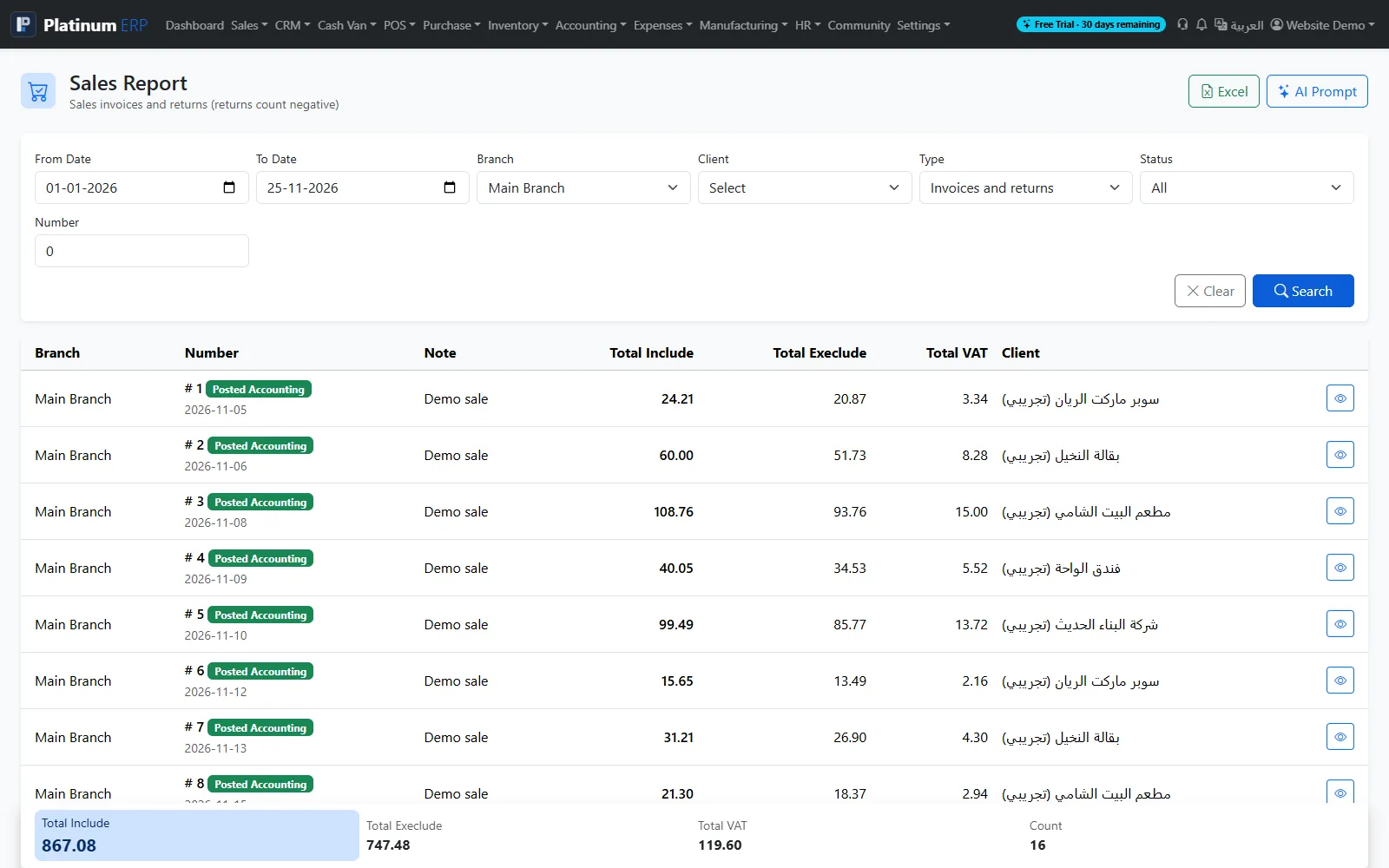
- Sales report per invoice and return with totals excluding and including VAT
- Sales by item, by category and total sales by category tree
- Sales cost and margin by category and by client
- Client, branch, supplier and VAT rate sales
- Sales days, sales by hour and sales by cost center
- Credit sales statement and sales details line by line
- Sales orders, orders versus invoices and open orders
Benefits for employees
- Orders converted to invoices without retyping
- Scan-based entry with Excel import for long invoices
- Returns that fill themselves from the original invoice
Benefits for management
- Agreed prices protected from order to invoice
- Margin by category and client from posted figures
- Open and expired orders visible at any time
Related modules
Inventory
Items, barcodes, stores, stock movements and stock taking, with one stock rule shared by every screen and report.
Learn moreAccounting
General ledger, receipts and payments, cheques, VAT and financial statements connected to every transaction.
Learn morePoint of Sale
A full screen sale screen in the browser that keeps selling without a connection and posts every sale to stock and the accounts.
Learn morePromotions and Offers
Item discounts, free items, bundles and invoice discounts applied automatically at the point of sale, with dates, hours, targets and usage limits.
Learn moreCRM
Every client's activities, follow-ups, invoices and balance on one page, read directly from sales and accounting.
Learn moreMulti-Branch Management
Every branch and store in one company, with access, stock movements, prices and results kept per branch.
Learn moreFrequently asked questions
Does a sales order reserve or move stock?
No. A sales order is a commercial commitment: it never moves stock, the ledger or the client's balance. Stock moves when the invoice made from it is posted.
Can one sales order be delivered in several invoices?
Yes. Each conversion invoices what is left, line by line, and the order shows what was invoiced and what remains.
How is VAT calculated on discounted lines?
On the amount after the discount. In the back office the discount excludes VAT; the server works out the totals again on every save.
Can I see the profit of my sales?
Yes. The sales cost reports by category and by client value each sold unit at the item cost on the invoice's own date and show profit and margin.
Keep reading
Order to Cash
From the client's order to the money in the bank: the sales order, the invoice made from it, its journal entry and the collection.
Learn moreSales Returns
Taking goods back from a client correctly: against the original invoice when there is one, and what the return posts to stock and the ledger.
Learn moreAccounts Receivable
Following what clients owe, recording what they pay and turning received cheques into money in the bank.
Learn moreWholesale Trading
Sell by the carton on credit, collect by post-dated cheques and keep the warehouse, the orders and the receivables in one place.
Learn moreDistribution Companies
Several warehouses, goods in transit between them, salesmen responsible for their clients and receivables that must be collected on time.
Learn moreImprove profitability
Growing sales do not always mean growing profit. Profit improves when management knows which items, clients, branches and costs make or lose money.
Learn moreStart your free one-month trial
Discover how Platinum ERP can help you manage your business with confidence. Every module, your own company data, no payment details.