Purchasing
From the reorder suggestion to the posted purchase invoice: orders, receiving, invoices, returns and landed cost in one flow.
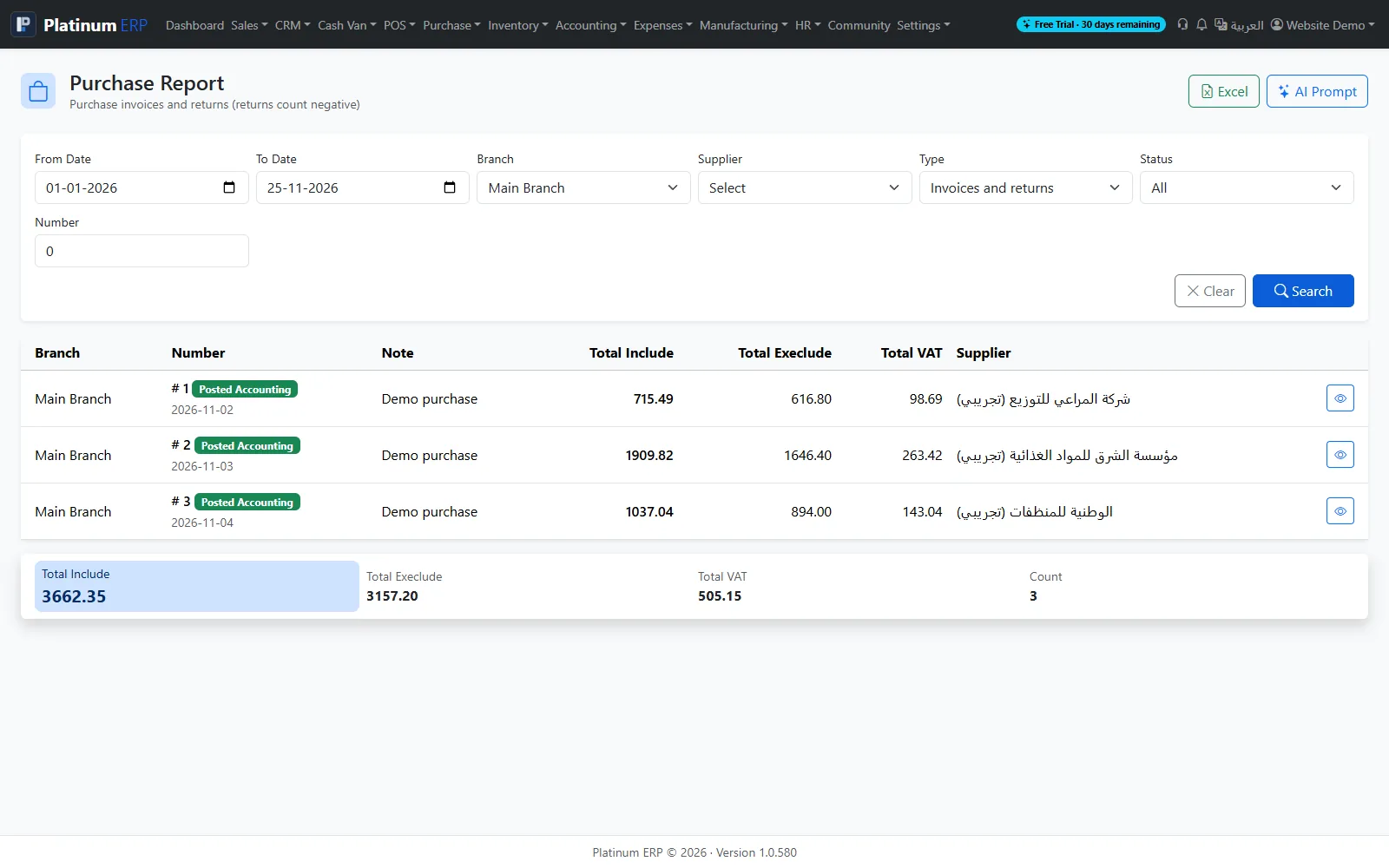
What is Purchasing in Platinum ERP?
Purchasing in Platinum ERP covers the buying cycle of the company: purchase orders with an approval stage, receiving against the order by scanning, the purchase invoice made from what was received, purchase returns and commercial purchases that spread freight and customs over the items. Posting a purchase invoice adds the stock, updates the item cost and credits the supplier's own account automatically.
Who needs it
Common problems and how Platinum ERP solves them
Buyers decide what to order from memory, so some items run out while others pile up.
Suggest from stock lists the supplier's items with their stock in the store today and proposes the quantity that fills each item from its minimum back to its maximum level.
Goods are received without checking them against the order, and the invoice is typed again.
The receiving screen counts by scanning against the approved order; finishing it creates the purchase invoice draft from what was really received, in one transaction.
Freight, customs and clearing costs never reach the item cost, so margins look better than they are.
A commercial purchase spreads its expenses over the lines by cost, by quantity or by manual percentages, and the item cost then includes that landed cost.
Two users approve or receive the same order at the same time.
Every stage change re-checks the order's current stage under a lock: only one approval or receipt wins, and the other user is told the order was changed.
How the daily work looks
- 1
Prepare the order
Create a purchase order for a supplier, branch and store, add lines by scan or search or let the system suggest quantities from stock, and set the expected date.
- 2
Approve
A user with the posting permission approves the order. Only draft orders can be edited; an approved order can go back to draft or be cancelled.
- 3
Receive
The storekeeper counts the delivered goods against the order, saves the count as it goes and finishes the receipt, following the company's receiving settings.
- 4
Invoice and post
The purchase invoice draft made from the receipt is completed with the supplier's invoice number and date, then posted: stock in, item cost updated, supplier credited.
- 5
Return and review
Return goods against the original invoice or without one, and review orders versus invoices, costs by supplier and supplier balances.
Available features
Purchase orders
Draft, approved, received and cancelled stages, with who approved and who received kept in the change history.
Reorder suggestions
The supplier's items with stock, minimum and maximum levels and a suggested quantity rounded up to full packs.
Receiving by scan
A phone-first web screen to count received goods by barcode, save the count and finish it once.
Receiving settings
Exact, less, more or less-or-more quantities, and whether receivers may change costs, enter free goods, give discounts or add items not ordered.
Purchase invoices
Scan-based lines with cost, discount and free goods, VAT taken from the item, the supplier's own invoice number and date, and an optional cash invoice that records the payment too.
Purchase returns
Returns against the posted invoice at its own costs and within the quantity left, or free returns without an origin.
Commercial purchase (landed cost)
Expense components paid to suppliers, cash or banks in their own currency, allocated over the lines, producing one purchase invoice and one expense journal.
Multi-currency purchasing
Invoices in the supplier's currency at a rate that stays fixed after saving, with the ledger in the company currency.
Stop purchasing an item
An item switched off for purchasing can't be ordered, received or invoiced, checked again at approval and posting.
Works with the other modules
Posted purchase invoices add stock in their store and set the item cost used by stock valuation and sales cost reports.
Posting debits purchases and input VAT and credits the supplier's own account; a commercial purchase also posts its expense journal.
Purchases paid in cash or by bank appear in the actual cash flow as purchases paid.
Orders belong to a branch: users see, approve and receive only the orders of their own branches.
Reports
- Purchases by supplier, by supplier and VAT rate, by cost center and by branch with the previous year
- Monthly purchase summary for a whole year
- Free goods by supplier and by item
- Purchase orders, orders versus invoices and unreceived or late orders
- Item cost by supplier with average, lowest, highest and last cost
- Suppliers statement and supplier movements with running balance
Benefits for employees
- Order quantities suggested from real stock instead of guesses
- Receiving by barcode with the invoice prepared automatically
- Clear messages when an order was changed by someone else
Benefits for management
- Approval before any order goes to the supplier
- True item costs that include freight and customs
- Supplier costs compared item by item
Related modules
Inventory
Items, barcodes, stores, stock movements and stock taking, with one stock rule shared by every screen and report.
Learn moreAccounting
General ledger, receipts and payments, cheques, VAT and financial statements connected to every transaction.
Learn moreSales
Sales orders, invoices and returns connected to stock, the client's account and detailed sales and profit reports.
Learn moreMulti-Branch Management
Every branch and store in one company, with access, stock movements, prices and results kept per branch.
Learn moreCash Flow
See where the cash went, which cheques fall due, and how the balance is expected to move over the coming months.
Learn moreFrequently asked questions
Does a purchase order move stock or the accounts?
No. A purchase order is a commitment only. Stock and the supplier's balance change when the purchase invoice made from the received order is posted.
How are freight and customs added to the item cost?
Record a commercial purchase with its expense components. When it is finalized, the expenses are spread over the lines and the purchase invoice lines carry that extra cost, so the item cost becomes the landed cost.
Can I return goods without the original invoice?
Yes. A return with an origin takes the costs and limits of the original invoice; a return without an origin is entered freely like an invoice.
Can purchase invoices be in a foreign currency?
Yes. The invoice takes the currency's rate when it is created and keeps it on every later save, while the ledger stays in the company currency.
Keep reading
Purchase to Pay
From the purchase order to the supplier payment: who does what, when stock arrives in the books and what each step posts.
Learn morePurchase Returns
Sending goods back to the supplier with the right cost, the right VAT and a supplier balance that matches the supplier's own records.
Learn moreAccounts Payable
Record what you owe each supplier, pay it on time and know the balance of every supplier at any moment.
Learn moreAutomate purchasing
Purchasing goes wrong when orders are placed by phone, goods are received without checking and invoices are paid without matching.
Learn moreWholesale Trading
Sell by the carton on credit, collect by post-dated cheques and keep the warehouse, the orders and the receivables in one place.
Learn moreDistribution Companies
Several warehouses, goods in transit between them, salesmen responsible for their clients and receivables that must be collected on time.
Learn moreStart your free one-month trial
Discover how Platinum ERP can help you manage your business with confidence. Every module, your own company data, no payment details.