CRM
Every client's activities, follow-ups, invoices and balance on one page, read directly from sales and accounting.
What is CRM in Platinum ERP?
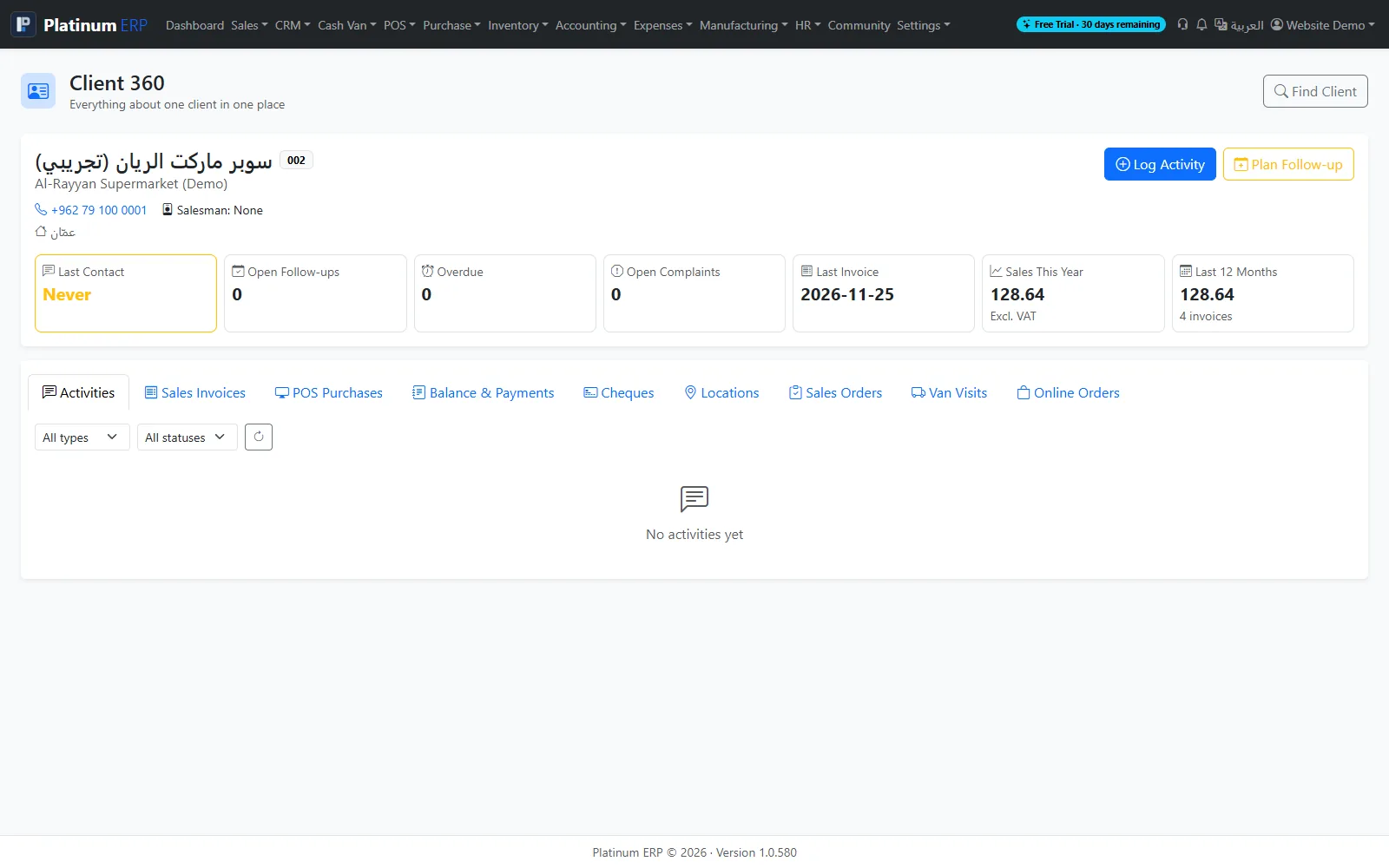
CRM in Platinum ERP gives each client a 360 view: calls, e-mails, visits, notes and complaints logged by the team, planned follow-ups with their owner and due date, and the client's invoices, sales orders, account statement and cheques read directly from sales and accounting. Nothing is copied, so the CRM always shows the same figures as the rest of the system.
Who can see what
Activities and follow-ups need a CRM permission. Invoice and sales panels need a sales permission and the ledger and cheques an accounting permission. Users edit their own activities; changing or reassigning another user's activities needs the CRM manage permission.
Who needs it
Common problems and how Platinum ERP solves them
What was said to a client lives in a salesman's notebook or phone, and leaves with him.
Calls, e-mails, visits, notes and complaints are logged on the client in the company's system, with the author and the date.
Promised call-backs and visits are forgotten.
A planned activity has a due date and an assigned user; My Follow-ups lists what is overdue, due today and due in the next seven days, and the menu shows the count.
Before visiting a client, the salesman has to ask accounting for the balance and the last invoices.
The Client 360 page shows the last invoice, sales of the year, sales orders, the account statement and the cheques, each part only to users allowed to read it.
Some clients haven't heard from the company for months and nobody notices.
The Clients Without Contact report lists the active clients without a completed activity for the number of days you choose.
How the daily work looks
- 1
Assign the clients
On each client card choose the salesman, a user linked to an active employee, so every salesman can filter on My clients.
- 2
Find the client
Search by name, code, phone or client type and open the Client 360 page with its card, locations, activity tiles and sales figures.
- 3
Log what happened
Record a call, e-mail, visit, note or complaint, optionally linked to one of the client's invoices or returns.
- 4
Plan the next step
Plan a follow-up with a due date and an assigned user, or complete an activity and plan the next one in a single action.
- 5
Review the team
Managers read the activities, follow-ups and no-contact reports, and follow up other users' lists.
Available features
Client 360
One page per client with the card, active locations, the last completed activity, open and overdue follow-ups, open complaints, the last invoice and sales of the year and of the last 12 months.
Activities
Calls and e-mails with direction, visits with the location, notes, complaints and follow-ups, each with subject, notes, date and author.
Follow-ups
Planned activities with a due date and an assignee, grouped as overdue, today and upcoming, with a count in the menu.
Document panels
Invoices, sales orders, point of sale sales, the account statement with running balance and the cheques of the client, read from the system, paged and limited to the period chosen.
Client salesman
Each client can have a salesman, an active user linked to an employee, used by My clients and the report filters.
E-mail button
Opens the user's mail program with the address from the client card and records an outbound e-mail activity.
Links to documents
An activity can be linked to a sales invoice, return, receipt or payment of the same client.
Permissions per panel
CRM, sales and accounting permissions decide which parts of the page a user sees; a part the user can't read is never loaded.
Change history
Changes to subject, type, date, status, due date and assignee of an activity are kept in the change history.
Works with the other modules
Invoices, returns, sales orders and point of sale sales of the client appear on Client 360, and confirming a sales order records an activity.
The client's account statement with running balance and its cheques are read from the ledger.
A client salesman must be a user linked to an active employee.
Invoices, ledger and cheques on Client 360 follow the branches each user is allowed to see.
Reports
- Activities report with a count per activity type
- Follow-ups report with days overdue and days to complete
- Clients without contact for a chosen number of days
- Client account statement and invoices from the Client 360 page
Benefits for employees
- Everything about a client on one page before a call or a visit
- A daily list of follow-ups instead of reminders on paper
- Logging a call or a visit takes a few seconds
Benefits for management
- Client relationships kept by the company, not by individuals
- Clear view of overdue follow-ups and neglected clients
- CRM figures that always match sales and accounting
Related modules
Sales
Sales orders, invoices and returns connected to stock, the client's account and detailed sales and profit reports.
Learn moreAccounting
General ledger, receipts and payments, cheques, VAT and financial statements connected to every transaction.
Learn moreHuman Resources
Employee files, documents, contracts, leaves and requests in one place, with approvals that follow your organization structure.
Learn moreMulti-Branch Management
Every branch and store in one company, with access, stock movements, prices and results kept per branch.
Learn moreFrequently asked questions
Is the CRM a separate system from sales and accounting?
No. It reads the client's invoices, orders, balance and cheques directly from the same database, so nothing is synchronized or copied.
Does Platinum ERP send e-mails to clients?
No. The e-mail button opens the user's own mail program with the client's address, and the CRM records that an e-mail activity took place.
Can a manager see the follow-ups of every salesman?
Yes, with the CRM manage permission. Other users see their own follow-ups.
Can I find clients we haven't contacted recently?
Yes. The Clients Without Contact report lists active clients without a completed activity for the number of days you set, from 1 to 3650.
Keep reading
Order to Cash
From the client's order to the money in the bank: the sales order, the invoice made from it, its journal entry and the collection.
Learn moreAccounts Receivable
Following what clients owe, recording what they pay and turning received cheques into money in the bank.
Learn moreWholesale Trading
Sell by the carton on credit, collect by post-dated cheques and keep the warehouse, the orders and the receivables in one place.
Learn moreDistribution Companies
Several warehouses, goods in transit between them, salesmen responsible for their clients and receivables that must be collected on time.
Learn moreStart your free one-month trial
Discover how Platinum ERP can help you manage your business with confidence. Every module, your own company data, no payment details.