Cash Flow
See where the cash went, which cheques fall due, and how the balance is expected to move over the coming months.
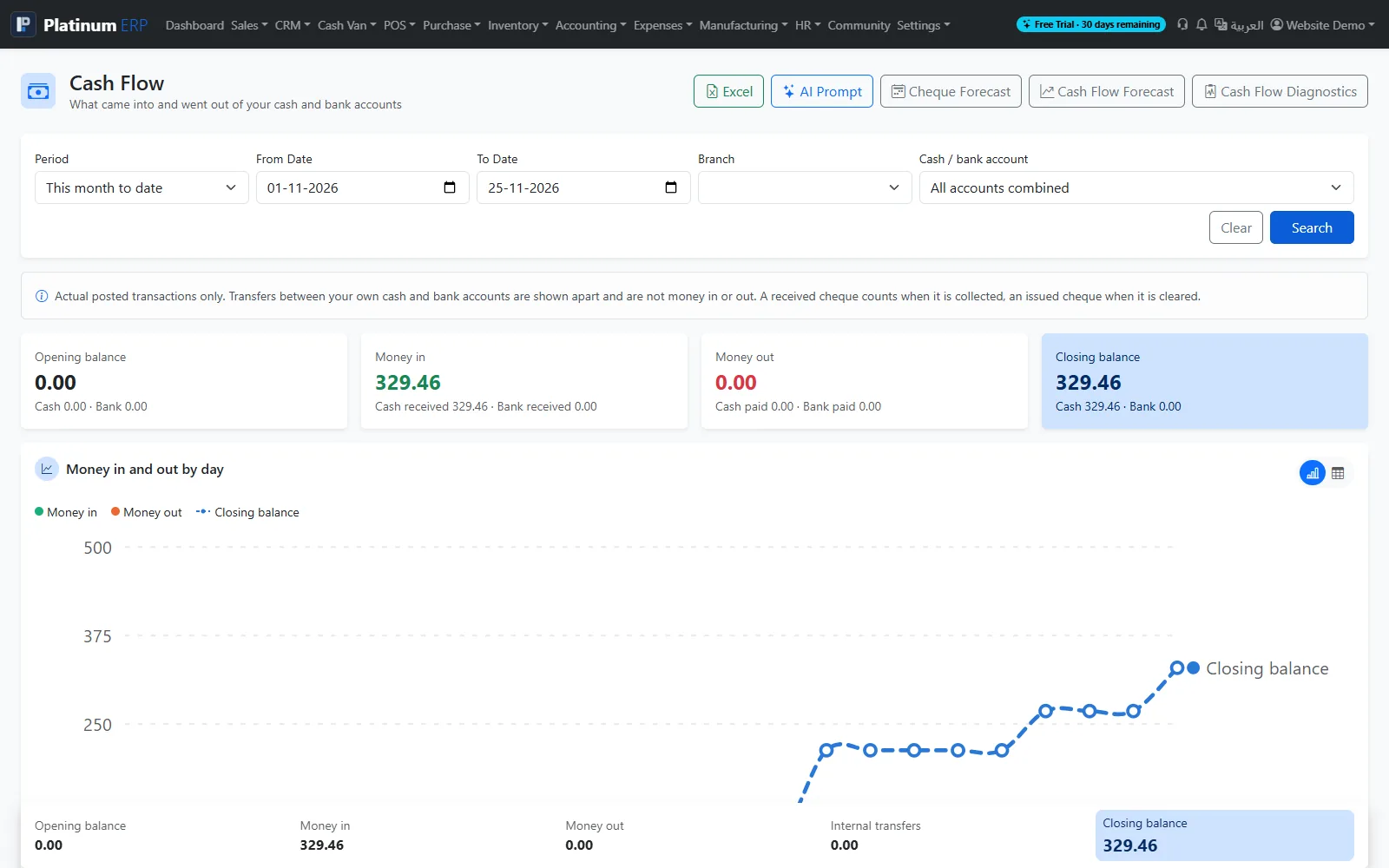
What is Cash Flow in Platinum ERP?
Platinum ERP Cash Flow reads the posted ledger of your cash and bank accounts to show the actual money that came in and went out, classified by source. On top of it, the cheque forecast, the cash flow forecast with three scenarios and the forecast versus actual diagnostics show what is expected next and how close earlier forecasts were.
Why the figures can be trusted
The actual cash flow uses only posted ledger lines. Received cheques count when they are collected and issued cheques when they are cleared, exactly as the ledger records them. Before showing any figure, the report checks that every account's movements equal its movement in the ledger; if they don't, it shows an error instead of wrong numbers.
Who needs it
Common problems and how Platinum ERP solves them
The business is profitable on paper but the bank account is often short.
The actual cash flow report shows, for any period, the money that really came in and went out of every cash and bank account, classified as sales, collections from clients, supplier payments, salaries, taxes, expenses and transfers.
Post-dated cheques are listed in a notebook, so nobody knows what will be collected or paid next week.
The cheque forecast lists every received cheque still under collection and every issued cheque not cleared yet, by expected date, and projects the cash and bank balance day by day.
Forecasts are built in spreadsheets that mix confirmed payments with guesses.
The forecast keeps committed items (cheques and fixed recurring expenses) apart from estimates based on the history of your own cash flow, and never counts the same amount twice.
Nobody checks afterwards whether the forecast was right.
A snapshot of the forecast is kept every day, and the diagnostics page compares it with what actually happened, category by category, with the reasons for the difference.
How the daily work looks
- 1
Read the actual cash flow
Choose a period and a branch: the report lists the opening balance, money in, money out and closing balance of each cash and bank account, and the movement by category. Money moved between two of your own accounts is shown as an internal transfer, not as income or spending.
- 2
Drill down to the vouchers
Open any category to see the vouchers behind it, open each voucher in the viewer, or jump to the account statement of a cash or bank account.
- 3
Check the cheques due
Open the cheque forecast for the next one, three or six months, with a settlement delay you choose, to see the cheques expected each day, overdue cheques, paying banks that would go below zero and received cheques that carry a higher risk.
- 4
Forecast the coming months
Run the forecast in Cheques only, Committed or Full mode and compare the Conservative, Expected and Optimistic scenarios. The settings (history months, weighting, scenario percentages) are saved per company.
- 5
Learn from the difference
At the end of a month, open the diagnostics page to compare the forecast with the actual cash flow and see which categories explain the difference.
Available features
Actual cash flow from posted entries
Built only from posted ledger lines of the linked cash account, bank accounts, van cash accounts and point of sale payment method accounts; every account's movement matches its account statement.
Automatic classification
Each voucher is classified by its type and its other lines: cash sales, collections, supplier payments, salaries, taxes, expenses, cheque collection or clearing, opening balances, or Other when it is mixed.
Internal transfers kept apart
Money moved between two of your own cash or bank accounts never appears as money in or money out of the combined balance.
Cheque forecast
Outstanding received and issued cheques as of any date, expected dates with a settlement delay of 0 to 90 days, overdue cheques flagged, and a day by day projected balance.
Paying bank check
For each bank, the balance minus the issued cheques it still has to pay, with its lowest expected point.
Received cheque risk
Cheques overdue for more than 30 days, or from clients who returned cheques before, are marked as higher risk.
Three forecast modes
Cheques only, Committed (cheques plus fixed recurring expenses paid from a cash or bank account) and Full (plus estimates from your own cash flow history).
Scenarios
Conservative, Expected and Optimistic scenarios scale only the estimates; committed amounts always stay as they are.
Lowest balance and shortfall
Every forecast shows the lowest expected balance, its date, and whether the cash goes below zero within the horizon.
Forecast versus actual
One forecast snapshot is saved each day; the diagnostics page compares it with the actual figures, explains the difference by category and shows the forecast accuracy of the past twelve months.
Works with the other modules
The cash flow reads posted journal lines only, so it always agrees with the ledger and the account statements.
Active recurring expenses with a fixed amount become committed payments in the forecast on their due dates.
Cash sales, point of sale payments and collections from clients feed the money in; received cheques count only when they are collected.
Paid purchases and payments to suppliers feed the money out; issued cheques count only when they are cleared.
Every cash flow page can be filtered by branch, and users see only the branches they are allowed to.
Reports
- Actual cash flow by account and by category, with drill down to the vouchers
- Cheque forecast with daily or weekly projected balance and paying bank balances
- Cash flow forecast by month with committed and estimated amounts per category
- Scenario comparison: Conservative, Expected and Optimistic closing balances
- Cash flow diagnostics: forecast versus actual with the explanation of the difference
- Forecast accuracy of the past twelve months
- Excel export of every table
Benefits for employees
- No manual cash spreadsheet: the figures come from the posted vouchers
- One click from a category to the vouchers and the account statement behind it
- Cheques due are visible in advance, by day and by bank
Benefits for management
- Early warning of a cash shortfall, with its expected date
- A clear separation between confirmed commitments and estimates
- Forecasts that are checked against reality every month
Related modules
Accounting
General ledger, receipts and payments, cheques, VAT and financial statements connected to every transaction.
Learn moreExpenses
Record every expense in a few fields, schedule the recurring ones, and let the system build the accounting entry.
Learn moreSales
Sales orders, invoices and returns connected to stock, the client's account and detailed sales and profit reports.
Learn morePurchasing
From the reorder suggestion to the posted purchase invoice: orders, receiving, invoices, returns and landed cost in one flow.
Learn moreReports and Dashboards
One dashboard for the whole business and a reports center that covers every department, all from the same live data.
Learn moreFrequently asked questions
Where does the cash flow data come from?
From the posted journal lines of your cash and bank accounts: the linked cash account, every bank's account, van cash accounts and the accounts of point of sale payment methods. Drafts are never counted.
Does the forecast turn unpaid sales invoices into expected cash?
No. Sales and purchases are never assumed to be cash. The forecast uses cheques, fixed recurring expenses and, in Full mode, estimates based on the history of your actual cash flow.
How far ahead can I forecast?
The cheque forecast and the cash flow forecast cover one, three or six months ahead.
Can I see the cash flow of one branch?
Yes. Every cash flow page has a branch filter, and each user sees only the branches assigned to them.
How do I know if the forecast was accurate?
The diagnostics page compares the forecast saved before a period with what actually happened, explains the difference by category, and shows the accuracy of the past twelve months.
Keep reading
Cash Flow Forecasting
See where cash came from and went, what is already promised, and when the balance may run short.
Learn moreCheque Management
Know where every received and issued cheque is, and let each status change post its own entry.
Learn moreManage cash flow
Many profitable businesses run short of cash because collections, cheques and fixed payments are not followed together.
Learn moreUnderstanding Cash Flow and Business Profitability
Profit tells you whether the business model works. Cash flow tells you whether the business can pay its bills next month.
Learn moreWhy Businesses Lose Money Even When Sales Are Increasing
Growth feels like success, but every additional sale can either build profit or quietly consume it.
Learn moreStart your free one-month trial
Discover how Platinum ERP can help you manage your business with confidence. Every module, your own company data, no payment details.